Internal Tool Optimization
Enhance organizational efficiency by refining proprietary interfaces to empower internal team workflows.
Enhance organizational efficiency by refining proprietary interfaces to empower internal team workflows.

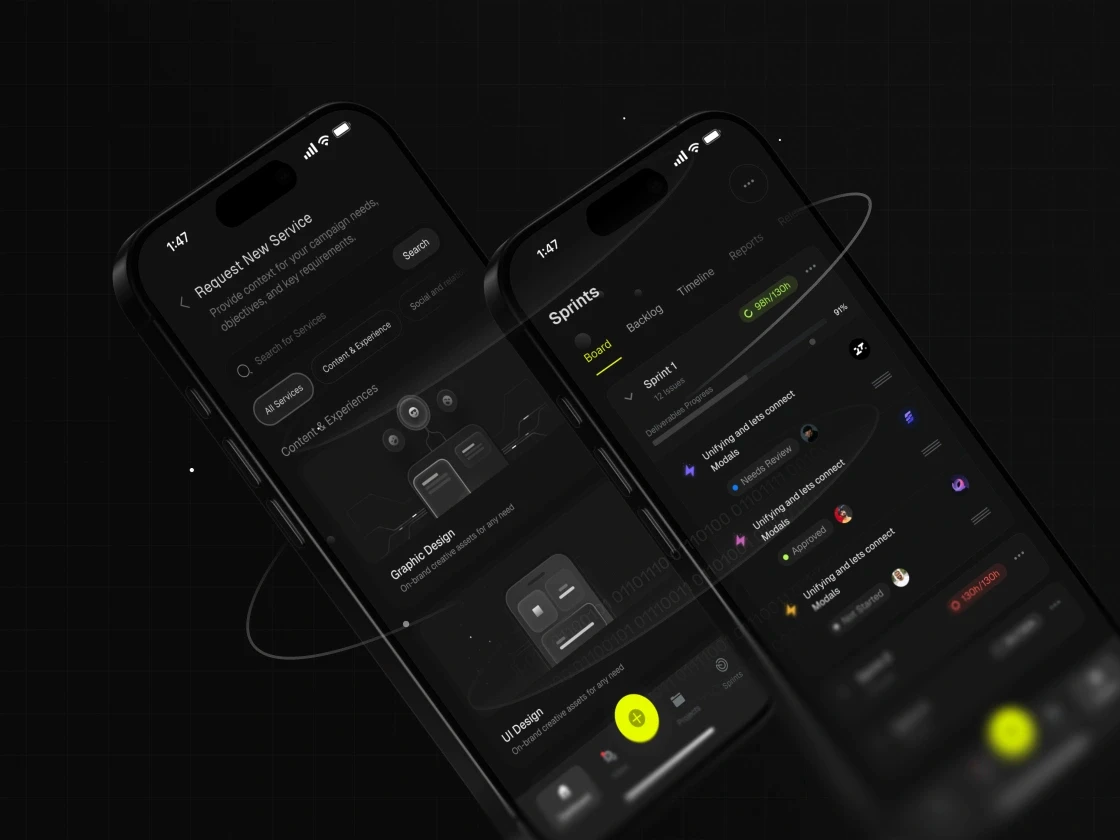
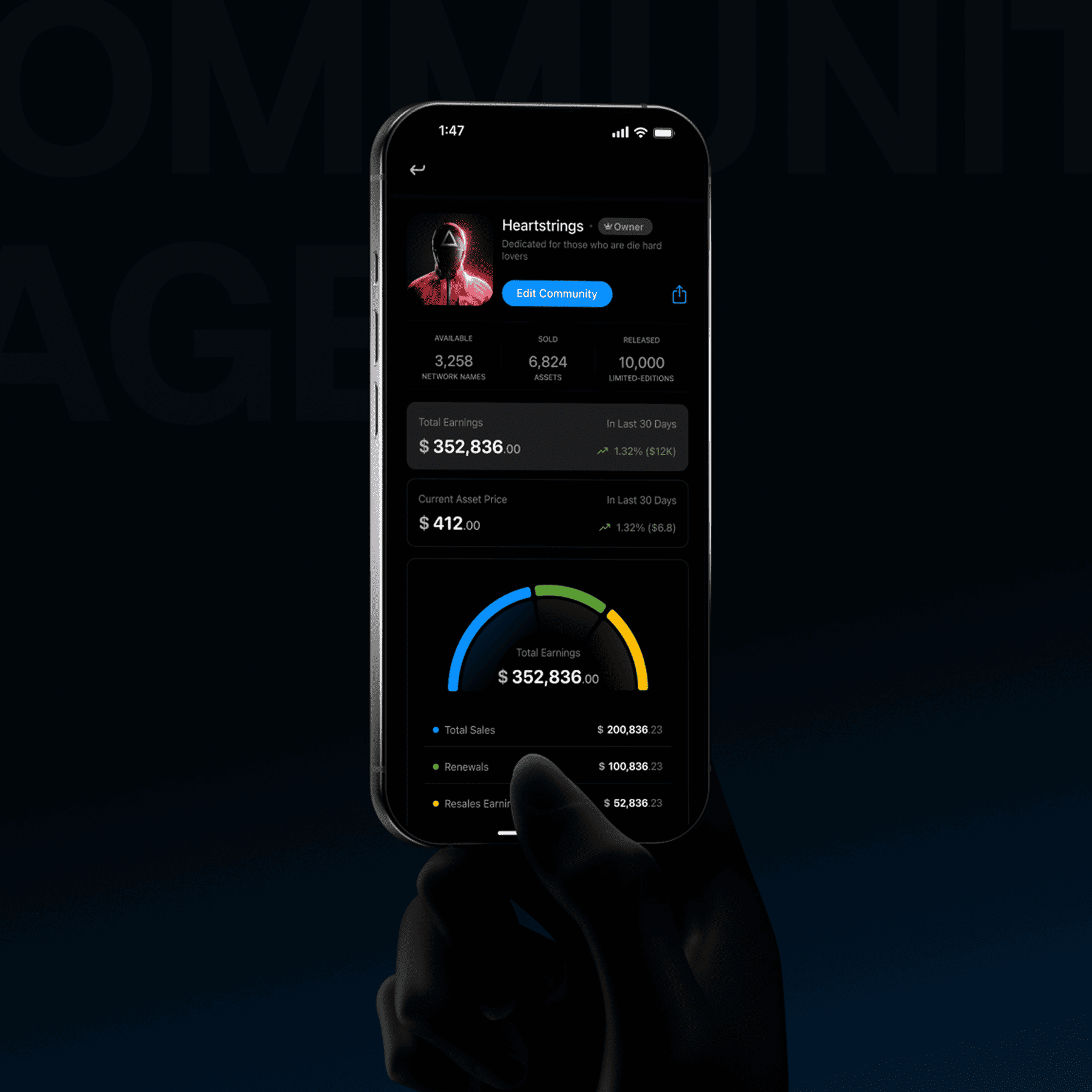
Poorly designed tools force teams into manual workarounds
Many internal platforms prioritize backend logic over front-end usability. This lack of clarity turns simple tasks into bottlenecked processes, forcing your team to manage data in spreadsheets rather than the tools built for them.
“
What you get
Workflow Audits
Task Simplification
Error State Logic
Productivity Metrics
Layout Restructuring
Automation Mapping
Access Controls
Handoff Specs
Workflow Audits
A deep-dive analysis of existing business processes to find bottlenecks and friction points that can be improved through design.
Error State Logic
Designing smart fallback systems and clear messaging to help users recover quickly from mistakes or system failures.
“
How it works
From 8 Weeks
From 8 Weeks
From 8 Weeks
1. Discovery
Understanding employee workflows, operational bottlenecks, and efficiency goals.
2. Architecture
Restructuring complex internal processes into streamlined, logical task flows.
3. Design
Designing highly functional, utilitarian UI focused strictly on speed and productivity.
4. Validation
Testing with internal teams to measure improvements in task completion times.
“
Optimized Internal Tools lead to
Workflow
ClarityTask Flow Review
Review manual steps and make frequent employee tasks easier to follow.
Input
ClarityInput Safeguards
Use clear inputs, constraints, and validation states for routine work.
Onboarding
FlowTraining Guidance
Simplify workflows and document how new team members complete core tasks.
Tool
ConsolidationConnected Workflows
Connect related tasks when one product fits the operating model.
Operational
FitProcess-Aligned UI
Shape the interface around approved roles, rules, and working practices.
“
Strategic packages optimized for any entity
Since 2008, trusted by brands that scale.

STC
,

Speedi
,

Motory
,

POSRocket
,
Telenav

Moktiv
,

Giant
,
VIBES
VIBES
Vibes
,
And many more growing teams.
“
Are they trustworthy?
“
“
 believethatskillsreflectinthefeedbackonegets.Soweletourclients
 sayitinstead.
“
Plexable was a pleasure to work with!
We thoroughly enjoyed collaborating with Hamza, Abdul, and the team. They took ownership from day 1 and impressed us with their exceptional UX/UI expertise, and went above and beyond to help and support us.
Suruchi Gupta
Founder, Confidential
“
Working with Plexable
will accelerate your projectWorking with Plexable will accelerate your project. They provided me with extremely high-quality User Experience / Flow diagrams, and they provided it in a quick time frame and as promised. Unlike with other offshore providers that are reactive, Plexable drove the process and provided strong suggestions for improvement throughout. They took real ownership of the project as if it were their own.
Ahmad Wahidi
CEO, ELmeter

“
It was a genuinely smooth experience.
It was a genuinely smooth experience. They have a great eye for design, communicate clearly, and handle feedback with real professionalism. This was my second project with them, and once again, they delivered high-quality work ahead of schedule.
Omar Aref
Founder, DadCam
“
They delivered High Quality, Thoughtful Designs
We hired Hamza and his agency again for follow-up design work on our B2B SaaS platform, and as always, they did a fantastic job. had a pleasure to work with throughout. Reliable and flexible - we’ll definitely continue working with him.
Charles Pan
CPO, Revel Street

“
I have only good things
to say about the team at PlexableI have only good things to say about the team at Plexable. They bleed design and have a wealth of experience in UI/UX. The result for me was a very coherent design that is both beautiful and functional. I enjoyed every part of this project and can't wait for more projects with Plexable.
Mohammad Jawahri
CEO, Ursumli Game
“
It was a genuinely smooth experience
It was a genuinely smooth experience. They have a great eye for design, communicate clearly, and handle feedback with real professionalism. This was my second project with them, and once again, they delivered high-quality work ahead of schedule.
Truls Kasa
Co-Founder, Moktiv

“
Plexable helped us refine our core experience
By focusing on the logic, not just the visuals. They took our complex requirements and simplified them into a very clean, usable interface. It’s rare to find a design team that stays this focused on the actual end-user throughout the whole process.
Confidential
Co-Founder, Uxability
“
Plexable was a pleasure to work with!
We thoroughly enjoyed collaborating with Hamza, Abdul, and the team. They took ownership from day 1 and impressed us with their exceptional UX/UI expertise, and went above and beyond to help and support us.
Suruchi Gupta
Founder, Confidential
“
Working with Plexable
will accelerate your projectWorking with Plexable will accelerate your project. They provided me with extremely high-quality User Experience / Flow diagrams, and they provided it in a quick time frame and as promised. Unlike with other offshore providers that are reactive, Plexable drove the process and provided strong suggestions for improvement throughout. They took real ownership of the project as if it were their own.
Ahmad Wahidi
CEO, ELmeter
“
It was a genuinely smooth experience.
It was a genuinely smooth experience. They have a great eye for design, communicate clearly, and handle feedback with real professionalism. This was my second project with them, and once again, they delivered high-quality work ahead of schedule.
Omar Aref
Founder, DadCam
“
They delivered High Quality, Thoughtful Designs
We hired Hamza and his agency again for follow-up design work on our B2B SaaS platform, and as always, they did a fantastic job. had a pleasure to work with throughout. Reliable and flexible - we’ll definitely continue working with him.
Charles Pan
CPO, Revel Street
“
I have only good things
to say about the team at PlexableI have only good things to say about the team at Plexable. They bleed design and have a wealth of experience in UI/UX. The result for me was a very coherent design that is both beautiful and functional. I enjoyed every part of this project and can't wait for more projects with Plexable.
Mohammad Jawahri
CEO, Ursumli Game
“
It was a genuinely smooth experience
It was a genuinely smooth experience. They have a great eye for design, communicate clearly, and handle feedback with real professionalism. This was my second project with them, and once again, they delivered high-quality work ahead of schedule.
Truls Kasa
Co-Founder, Moktiv
“
Plexable helped us refine our core experience
By focusing on the logic, not just the visuals. They took our complex requirements and simplified them into a very clean, usable interface. It’s rare to find a design team that stays this focused on the actual end-user throughout the whole process.
Confidential
Co-Founder, Uxability
“
Plexable was a pleasure to work with!
We thoroughly enjoyed collaborating with Hamza, Abdul, and the team. They took ownership from day 1 and impressed us with their exceptional UX/UI expertise, and went above and beyond to help and support us.
Suruchi Gupta
Founder, Confidential
“
Working with Plexable
will accelerate your projectWorking with Plexable will accelerate your project. They provided me with extremely high-quality User Experience / Flow diagrams, and they provided it in a quick time frame and as promised. Unlike with other offshore providers that are reactive, Plexable drove the process and provided strong suggestions for improvement throughout. They took real ownership of the project as if it were their own.
Ahmad Wahidi
CEO, ELmeter
“
It was a genuinely smooth experience.
It was a genuinely smooth experience. They have a great eye for design, communicate clearly, and handle feedback with real professionalism. This was my second project with them, and once again, they delivered high-quality work ahead of schedule.
Omar Aref
Founder, DadCam
“
They delivered High Quality, Thoughtful Designs
We hired Hamza and his agency again for follow-up design work on our B2B SaaS platform, and as always, they did a fantastic job. had a pleasure to work with throughout. Reliable and flexible - we’ll definitely continue working with him.
Charles Pan
CPO, Revel Street
“
I have only good things
to say about the team at PlexableI have only good things to say about the team at Plexable. They bleed design and have a wealth of experience in UI/UX. The result for me was a very coherent design that is both beautiful and functional. I enjoyed every part of this project and can't wait for more projects with Plexable.
Mohammad Jawahri
CEO, Ursumli Game
“
It was a genuinely smooth experience
It was a genuinely smooth experience. They have a great eye for design, communicate clearly, and handle feedback with real professionalism. This was my second project with them, and once again, they delivered high-quality work ahead of schedule.
Truls Kasa
Co-Founder, Moktiv
“
Plexable helped us refine our core experience
By focusing on the logic, not just the visuals. They took our complex requirements and simplified them into a very clean, usable interface. It’s rare to find a design team that stays this focused on the actual end-user throughout the whole process.
Confidential
Co-Founder, Uxability
“
Plexable was a pleasure to work with!
We thoroughly enjoyed collaborating with Hamza, Abdul, and the team. They took ownership from day 1 and impressed us with their exceptional UX/UI expertise, and went above and beyond to help and support us.
Suruchi Gupta
Founder, Confidential
“
Working with Plexable
will accelerate your projectWorking with Plexable will accelerate your project. They provided me with extremely high-quality User Experience / Flow diagrams, and they provided it in a quick time frame and as promised. Unlike with other offshore providers that are reactive, Plexable drove the process and provided strong suggestions for improvement throughout. They took real ownership of the project as if it were their own.
Ahmad Wahidi
CEO, ELmeter
“
It was a genuinely smooth experience.
It was a genuinely smooth experience. They have a great eye for design, communicate clearly, and handle feedback with real professionalism. This was my second project with them, and once again, they delivered high-quality work ahead of schedule.
Omar Aref
Founder, DadCam
“
They delivered High Quality, Thoughtful Designs
We hired Hamza and his agency again for follow-up design work on our B2B SaaS platform, and as always, they did a fantastic job. had a pleasure to work with throughout. Reliable and flexible - we’ll definitely continue working with him.
Charles Pan
CPO, Revel Street
“
I have only good things
to say about the team at PlexableI have only good things to say about the team at Plexable. They bleed design and have a wealth of experience in UI/UX. The result for me was a very coherent design that is both beautiful and functional. I enjoyed every part of this project and can't wait for more projects with Plexable.
Mohammad Jawahri
CEO, Ursumli Game
“
It was a genuinely smooth experience
It was a genuinely smooth experience. They have a great eye for design, communicate clearly, and handle feedback with real professionalism. This was my second project with them, and once again, they delivered high-quality work ahead of schedule.
Truls Kasa
Co-Founder, Moktiv
“
Plexable helped us refine our core experience
By focusing on the logic, not just the visuals. They took our complex requirements and simplified them into a very clean, usable interface. It’s rare to find a design team that stays this focused on the actual end-user throughout the whole process.
Confidential
Co-Founder, Uxability
“
Plexable was a pleasure to work with!
We thoroughly enjoyed collaborating with Hamza, Abdul, and the team. They took ownership from day 1 and impressed us with their exceptional UX/UI expertise, and went above and beyond to help and support us.
Suruchi Gupta
Founder, Confidential
“
Working with Plexablewill accelerate your project
Working with Plexable will accelerate your project. They provided me with extremely high-quality User Experience / Flow diagrams, and they provided it in a quick time frame and as promised. Unlike with other offshore providers that are reactive, Plexable drove the process and provided strong suggestions for improvement throughout. They took real ownership of the project as if it were their own.
Ahmad Wahidi
CEO, ELmeter
“
It was a genuinely smooth experience.
It was a genuinely smooth experience. They have a great eye for design, communicate clearly, and handle feedback with real professionalism. This was my second project with them, and once again, they delivered high-quality work ahead of schedule.
Omar Aref
Founder, DadCam
“
They delivered High Quality, Thoughtful Designs
We hired Hamza and his agency again for follow-up design work on our B2B SaaS platform, and as always, they did a fantastic job. had a pleasure to work with throughout. Reliable and flexible - we’ll definitely continue working with him.
Charles Pan
CPO, Revel Street
“
I have only good thingsto say about the team at Plexable
I have only good things to say about the team at Plexable. They bleed design and have a wealth of experience in UI/UX. The result for me was a very coherent design that is both beautiful and functional. I enjoyed every part of this project and can't wait for more projects with Plexable.
Mohammad Jawahri
CEO, Ursumli Game
“
They delivered High Quality, Thoughtful Designs
We hired Hamza and his agency again for follow-up design work on our B2B SaaS platform, and as always, they did a fantastic job. had a pleasure to work with throughout. Reliable and flexible - we’ll definitely continue working with him.
Truls Kasa
Co-Founder, Moktiv
“
Plexable helped us refine our core experience
By focusing on the logic, not just the visuals. They took our complex requirements and simplified them into a very clean, usable interface. It’s rare to find a design team that stays this focused on the actual end-user throughout the whole process.
Confidential
Co-Founder, Uxability
“
Plexable was a pleasure to work with!
We thoroughly enjoyed collaborating with Hamza, Abdul, and the team. They took ownership from day 1 and impressed us with their exceptional UX/UI expertise, and went above and beyond to help and support us.
Suruchi Gupta
Founder, Confidential
“
Working with Plexablewill accelerate your project
Working with Plexable will accelerate your project. They provided me with extremely high-quality User Experience / Flow diagrams, and they provided it in a quick time frame and as promised. Unlike with other offshore providers that are reactive, Plexable drove the process and provided strong suggestions for improvement throughout. They took real ownership of the project as if it were their own.
Ahmad Wahidi
CEO, ELmeter
“
It was a genuinely smooth experience.
It was a genuinely smooth experience. They have a great eye for design, communicate clearly, and handle feedback with real professionalism. This was my second project with them, and once again, they delivered high-quality work ahead of schedule.
Omar Aref
Founder, DadCam
“
They delivered High Quality, Thoughtful Designs
We hired Hamza and his agency again for follow-up design work on our B2B SaaS platform, and as always, they did a fantastic job. had a pleasure to work with throughout. Reliable and flexible - we’ll definitely continue working with him.
Charles Pan
CPO, Revel Street
“
I have only good thingsto say about the team at Plexable
I have only good things to say about the team at Plexable. They bleed design and have a wealth of experience in UI/UX. The result for me was a very coherent design that is both beautiful and functional. I enjoyed every part of this project and can't wait for more projects with Plexable.
Mohammad Jawahri
CEO, Ursumli Game
“
They delivered High Quality, Thoughtful Designs
We hired Hamza and his agency again for follow-up design work on our B2B SaaS platform, and as always, they did a fantastic job. had a pleasure to work with throughout. Reliable and flexible - we’ll definitely continue working with him.
Truls Kasa
Co-Founder, Moktiv
“
Plexable helped us refine our core experience
By focusing on the logic, not just the visuals. They took our complex requirements and simplified them into a very clean, usable interface. It’s rare to find a design team that stays this focused on the actual end-user throughout the whole process.
Confidential
Co-Founder, Uxability
“
Plexable was a pleasure to work with!
We thoroughly enjoyed collaborating with Hamza, Abdul, and the team. They took ownership from day 1 and impressed us with their exceptional UX/UI expertise, and went above and beyond to help and support us.
Suruchi Gupta
Founder, Confidential
“
Working with Plexablewill accelerate your project
Working with Plexable will accelerate your project. They provided me with extremely high-quality User Experience / Flow diagrams, and they provided it in a quick time frame and as promised. Unlike with other offshore providers that are reactive, Plexable drove the process and provided strong suggestions for improvement throughout. They took real ownership of the project as if it were their own.
Ahmad Wahidi
CEO, ELmeter
“
It was a genuinely smooth experience.
It was a genuinely smooth experience. They have a great eye for design, communicate clearly, and handle feedback with real professionalism. This was my second project with them, and once again, they delivered high-quality work ahead of schedule.
Omar Aref
Founder, DadCam
“
They delivered High Quality, Thoughtful Designs
We hired Hamza and his agency again for follow-up design work on our B2B SaaS platform, and as always, they did a fantastic job. had a pleasure to work with throughout. Reliable and flexible - we’ll definitely continue working with him.
Charles Pan
CPO, Revel Street
“
I have only good thingsto say about the team at Plexable
I have only good things to say about the team at Plexable. They bleed design and have a wealth of experience in UI/UX. The result for me was a very coherent design that is both beautiful and functional. I enjoyed every part of this project and can't wait for more projects with Plexable.
Mohammad Jawahri
CEO, Ursumli Game
“
They delivered High Quality, Thoughtful Designs
We hired Hamza and his agency again for follow-up design work on our B2B SaaS platform, and as always, they did a fantastic job. had a pleasure to work with throughout. Reliable and flexible - we’ll definitely continue working with him.
Truls Kasa
Co-Founder, Moktiv
“
Plexable helped us refine our core experience
By focusing on the logic, not just the visuals. They took our complex requirements and simplified them into a very clean, usable interface. It’s rare to find a design team that stays this focused on the actual end-user throughout the whole process.
Confidential
Co-Founder, Uxability
“
Plexable was a pleasure to work with!
We thoroughly enjoyed collaborating with Hamza, Abdul, and the team. They took ownership from day 1 and impressed us with their exceptional UX/UI expertise, and went above and beyond to help and support us.
Suruchi Gupta
Founder, Confidential
“
Working with Plexablewill accelerate your project
Working with Plexable will accelerate your project. They provided me with extremely high-quality User Experience / Flow diagrams, and they provided it in a quick time frame and as promised. Unlike with other offshore providers that are reactive, Plexable drove the process and provided strong suggestions for improvement throughout. They took real ownership of the project as if it were their own.
Ahmad Wahidi
CEO, ELmeter
“
It was a genuinely smooth experience.
It was a genuinely smooth experience. They have a great eye for design, communicate clearly, and handle feedback with real professionalism. This was my second project with them, and once again, they delivered high-quality work ahead of schedule.
Omar Aref
Founder, DadCam
“
They delivered High Quality, Thoughtful Designs
We hired Hamza and his agency again for follow-up design work on our B2B SaaS platform, and as always, they did a fantastic job. had a pleasure to work with throughout. Reliable and flexible - we’ll definitely continue working with him.
Charles Pan
CPO, Revel Street
“
I have only good thingsto say about the team at Plexable
I have only good things to say about the team at Plexable. They bleed design and have a wealth of experience in UI/UX. The result for me was a very coherent design that is both beautiful and functional. I enjoyed every part of this project and can't wait for more projects with Plexable.
Mohammad Jawahri
CEO, Ursumli Game
“
They delivered High Quality, Thoughtful Designs
We hired Hamza and his agency again for follow-up design work on our B2B SaaS platform, and as always, they did a fantastic job. had a pleasure to work with throughout. Reliable and flexible - we’ll definitely continue working with him.
Truls Kasa
Co-Founder, Moktiv
“
Plexable helped us refine our core experience
By focusing on the logic, not just the visuals. They took our complex requirements and simplified them into a very clean, usable interface. It’s rare to find a design team that stays this focused on the actual end-user throughout the whole process.
Confidential
Co-Founder, Uxability
“
Plexable was a pleasure to work with!
We thoroughly enjoyed collaborating with Hamza, Abdul, and the team. They took ownership from day 1 and impressed us with their exceptional UX/UI expertise, and went above and beyond to help and support us.
Suruchi Gupta
Founder, Confidential
“
Plexable was a pleasure to work with!
We thoroughly enjoyed collaborating with Hamza, Abdul, and the team. They took ownership from day 1 and impressed us with their exceptional UX/UI expertise, and went above and beyond to help and support us.
Ahmad Wahidi
CEO, ELmeter
“
It was a genuinely smooth experience.
It was a genuinely smooth experience. They have a great eye for design, communicate clearly, and handle feedback with real professionalism. This was my second project with them, and once again, they delivered high-quality work ahead of schedule.
Omar Aref
Founder, DadCam
“
They delivered High Quality, Thoughtful Designs
We hired Hamza and his agency again for follow-up design work on our B2B SaaS platform, and as always, they did a fantastic job. had a pleasure to work with throughout. Reliable and flexible - we’ll definitely continue working with him.
Charles Pan
CPO, Revel Street
“
I have only good thingsto say about the team at Plexable
I have only good things to say about the team at Plexable. They bleed design and have a wealth of experience in UI/UX. The result for me was a very coherent design that is both beautiful and functional. I enjoyed every part of this project and can't wait for more projects with Plexable.
Mohammad Jawahri
CEO, Ursumli Game
“
They delivered High Quality, Thoughtful Designs
We hired Hamza and his agency again for follow-up design work on our B2B SaaS platform, and as always, they did a fantastic job. had a pleasure to work with throughout. Reliable and flexible - we’ll definitely continue working with him.
Truls Kasa
Co-Founder, Moktiv
“
Plexable helped us refine our core experience
By focusing on the logic, not just the visuals. They took our complex requirements and simplified them into a very clean, usable interface. It’s rare to find a design team that stays this focused on the actual end-user throughout the whole process.
Confidential
Co-Founder, Uxability
“
Plexable was a pleasure to work with!
We thoroughly enjoyed collaborating with Hamza, Abdul, and the team. They took ownership from day 1 and impressed us with their exceptional UX/UI expertise, and went above and beyond to help and support us.
Suruchi Gupta
Founder, Confidential
“
Plexable was a pleasure to work with!
We thoroughly enjoyed collaborating with Hamza, Abdul, and the team. They took ownership from day 1 and impressed us with their exceptional UX/UI expertise, and went above and beyond to help and support us.
Ahmad Wahidi
CEO, ELmeter
“
It was a genuinely smooth experience.
It was a genuinely smooth experience. They have a great eye for design, communicate clearly, and handle feedback with real professionalism. This was my second project with them, and once again, they delivered high-quality work ahead of schedule.
Omar Aref
Founder, DadCam
“
They delivered High Quality, Thoughtful Designs
We hired Hamza and his agency again for follow-up design work on our B2B SaaS platform, and as always, they did a fantastic job. had a pleasure to work with throughout. Reliable and flexible - we’ll definitely continue working with him.
Charles Pan
CPO, Revel Street
“
I have only good thingsto say about the team at Plexable
I have only good things to say about the team at Plexable. They bleed design and have a wealth of experience in UI/UX. The result for me was a very coherent design that is both beautiful and functional. I enjoyed every part of this project and can't wait for more projects with Plexable.
Mohammad Jawahri
CEO, Ursumli Game
“
They delivered High Quality, Thoughtful Designs
We hired Hamza and his agency again for follow-up design work on our B2B SaaS platform, and as always, they did a fantastic job. had a pleasure to work with throughout. Reliable and flexible - we’ll definitely continue working with him.
Truls Kasa
Co-Founder, Moktiv
“
Plexable helped us refine our core experience
By focusing on the logic, not just the visuals. They took our complex requirements and simplified them into a very clean, usable interface. It’s rare to find a design team that stays this focused on the actual end-user throughout the whole process.
Confidential
Co-Founder, Uxability
“
Plexable was a pleasure to work with!
We thoroughly enjoyed collaborating with Hamza, Abdul, and the team. They took ownership from day 1 and impressed us with their exceptional UX/UI expertise, and went above and beyond to help and support us.
Suruchi Gupta
Founder, Confidential
“
Plexable was a pleasure to work with!
We thoroughly enjoyed collaborating with Hamza, Abdul, and the team. They took ownership from day 1 and impressed us with their exceptional UX/UI expertise, and went above and beyond to help and support us.
Ahmad Wahidi
CEO, ELmeter
“
It was a genuinely smooth experience.
It was a genuinely smooth experience. They have a great eye for design, communicate clearly, and handle feedback with real professionalism. This was my second project with them, and once again, they delivered high-quality work ahead of schedule.
Omar Aref
Founder, DadCam
“
They delivered High Quality, Thoughtful Designs
We hired Hamza and his agency again for follow-up design work on our B2B SaaS platform, and as always, they did a fantastic job. had a pleasure to work with throughout. Reliable and flexible - we’ll definitely continue working with him.
Charles Pan
CPO, Revel Street
“
I have only good thingsto say about the team at Plexable
I have only good things to say about the team at Plexable. They bleed design and have a wealth of experience in UI/UX. The result for me was a very coherent design that is both beautiful and functional. I enjoyed every part of this project and can't wait for more projects with Plexable.
Mohammad Jawahri
CEO, Ursumli Game
“
They delivered High Quality, Thoughtful Designs
We hired Hamza and his agency again for follow-up design work on our B2B SaaS platform, and as always, they did a fantastic job. had a pleasure to work with throughout. Reliable and flexible - we’ll definitely continue working with him.
Truls Kasa
Co-Founder, Moktiv
“
Plexable helped us refine our core experience
By focusing on the logic, not just the visuals. They took our complex requirements and simplified them into a very clean, usable interface. It’s rare to find a design team that stays this focused on the actual end-user throughout the whole process.
Confidential
Co-Founder, Uxability
“
Plexable was a pleasure to work with!
We thoroughly enjoyed collaborating with Hamza, Abdul, and the team. They took ownership from day 1 and impressed us with their exceptional UX/UI expertise, and went above and beyond to help and support us.
Suruchi Gupta
Founder, Confidential
“
Plexable was a pleasure to work with!
We thoroughly enjoyed collaborating with Hamza, Abdul, and the team. They took ownership from day 1 and impressed us with their exceptional UX/UI expertise, and went above and beyond to help and support us.
Ahmad Wahidi
CEO, ELmeter
“
It was a genuinely smooth experience.
It was a genuinely smooth experience. They have a great eye for design, communicate clearly, and handle feedback with real professionalism. This was my second project with them, and once again, they delivered high-quality work ahead of schedule.
Omar Aref
Founder, DadCam
“
They delivered High Quality, Thoughtful Designs
We hired Hamza and his agency again for follow-up design work on our B2B SaaS platform, and as always, they did a fantastic job. had a pleasure to work with throughout. Reliable and flexible - we’ll definitely continue working with him.
Charles Pan
CPO, Revel Street
“
I have only good thingsto say about the team at Plexable
I have only good things to say about the team at Plexable. They bleed design and have a wealth of experience in UI/UX. The result for me was a very coherent design that is both beautiful and functional. I enjoyed every part of this project and can't wait for more projects with Plexable.
Mohammad Jawahri
CEO, Ursumli Game
“
They delivered High Quality, Thoughtful Designs
We hired Hamza and his agency again for follow-up design work on our B2B SaaS platform, and as always, they did a fantastic job. had a pleasure to work with throughout. Reliable and flexible - we’ll definitely continue working with him.
Truls Kasa
Co-Founder, Moktiv
“
Plexable helped us refine our core experience
By focusing on the logic, not just the visuals. They took our complex requirements and simplified them into a very clean, usable interface. It’s rare to find a design team that stays this focused on the actual end-user throughout the whole process.
Confidential
Co-Founder, Uxability
Frequently Asked Questions
Training can help people learn a tool, but it cannot remove every problem in the interface or workflow. We review where staff lose time, make avoidable errors, or repeat manual steps, then redesign the priority tasks in scope. Any change in speed, accuracy, or workload should be measured after implementation.
Yes, when the system exposes enough data and functions for the proposed workflow. We can redesign the interface around current backend constraints. The client's technical team must confirm API access, security, performance, and feasibility before development.
ROI should be based on the current cost of priority tasks and the measured result after implementation. Useful inputs include task time, errors, rework, support demand, and staff affected. We can define the measurement plan, but savings should not be claimed before the new workflow is in use.
We use progressive disclosure to show the information needed for each step and reveal secondary detail when it becomes relevant. The work begins by mapping the task, roles, decisions, data states, and exceptions. Testing then checks whether people can find what they need without losing important context.
Yes, when employee research is in scope and the organization can provide access. Interviews, observation, or contextual inquiry can show how the tool fits real work and where staff face friction. The research plan should cover consent, privacy, scheduling, and restrictions on sensitive environments.
Depending on the complexity of the tool, a focused optimization project usually starts from 6–8 weeks. This includes the audit phase, the redesign of core workflows, and the creation of a high-fidelity prototype that is ready for your development team to implement.
Training can help people learn a tool, but it cannot remove every problem in the interface or workflow. We review where staff lose time, make avoidable errors, or repeat manual steps, then redesign the priority tasks in scope. Any change in speed, accuracy, or workload should be measured after implementation.
Yes, when the system exposes enough data and functions for the proposed workflow. We can redesign the interface around current backend constraints. The client's technical team must confirm API access, security, performance, and feasibility before development.
ROI should be based on the current cost of priority tasks and the measured result after implementation. Useful inputs include task time, errors, rework, support demand, and staff affected. We can define the measurement plan, but savings should not be claimed before the new workflow is in use.
We use progressive disclosure to show the information needed for each step and reveal secondary detail when it becomes relevant. The work begins by mapping the task, roles, decisions, data states, and exceptions. Testing then checks whether people can find what they need without losing important context.
Yes, when employee research is in scope and the organization can provide access. Interviews, observation, or contextual inquiry can show how the tool fits real work and where staff face friction. The research plan should cover consent, privacy, scheduling, and restrictions on sensitive environments.
Depending on the complexity of the tool, a focused optimization project usually starts from 6–8 weeks. This includes the audit phase, the redesign of core workflows, and the creation of a high-fidelity prototype that is ready for your development team to implement.
Training can help people learn a tool, but it cannot remove every problem in the interface or workflow. We review where staff lose time, make avoidable errors, or repeat manual steps, then redesign the priority tasks in scope. Any change in speed, accuracy, or workload should be measured after implementation.
Yes, when the system exposes enough data and functions for the proposed workflow. We can redesign the interface around current backend constraints. The client's technical team must confirm API access, security, performance, and feasibility before development.
ROI should be based on the current cost of priority tasks and the measured result after implementation. Useful inputs include task time, errors, rework, support demand, and staff affected. We can define the measurement plan, but savings should not be claimed before the new workflow is in use.
We use progressive disclosure to show the information needed for each step and reveal secondary detail when it becomes relevant. The work begins by mapping the task, roles, decisions, data states, and exceptions. Testing then checks whether people can find what they need without losing important context.
Yes, when employee research is in scope and the organization can provide access. Interviews, observation, or contextual inquiry can show how the tool fits real work and where staff face friction. The research plan should cover consent, privacy, scheduling, and restrictions on sensitive environments.
Depending on the complexity of the tool, a focused optimization project usually starts from 6–8 weeks. This includes the audit phase, the redesign of core workflows, and the creation of a high-fidelity prototype that is ready for your development team to implement.
Still have a question?
So, are you ready to create a wow-factor design?
Say
Say

Hello
Hello
Interested in joining our team?

Jordan