Workflow & Information Design
Make complex tasks, decisions and information easier to follow across products, teams and systems.
Make complex tasks, decisions and information easier to follow across products, teams and systems.

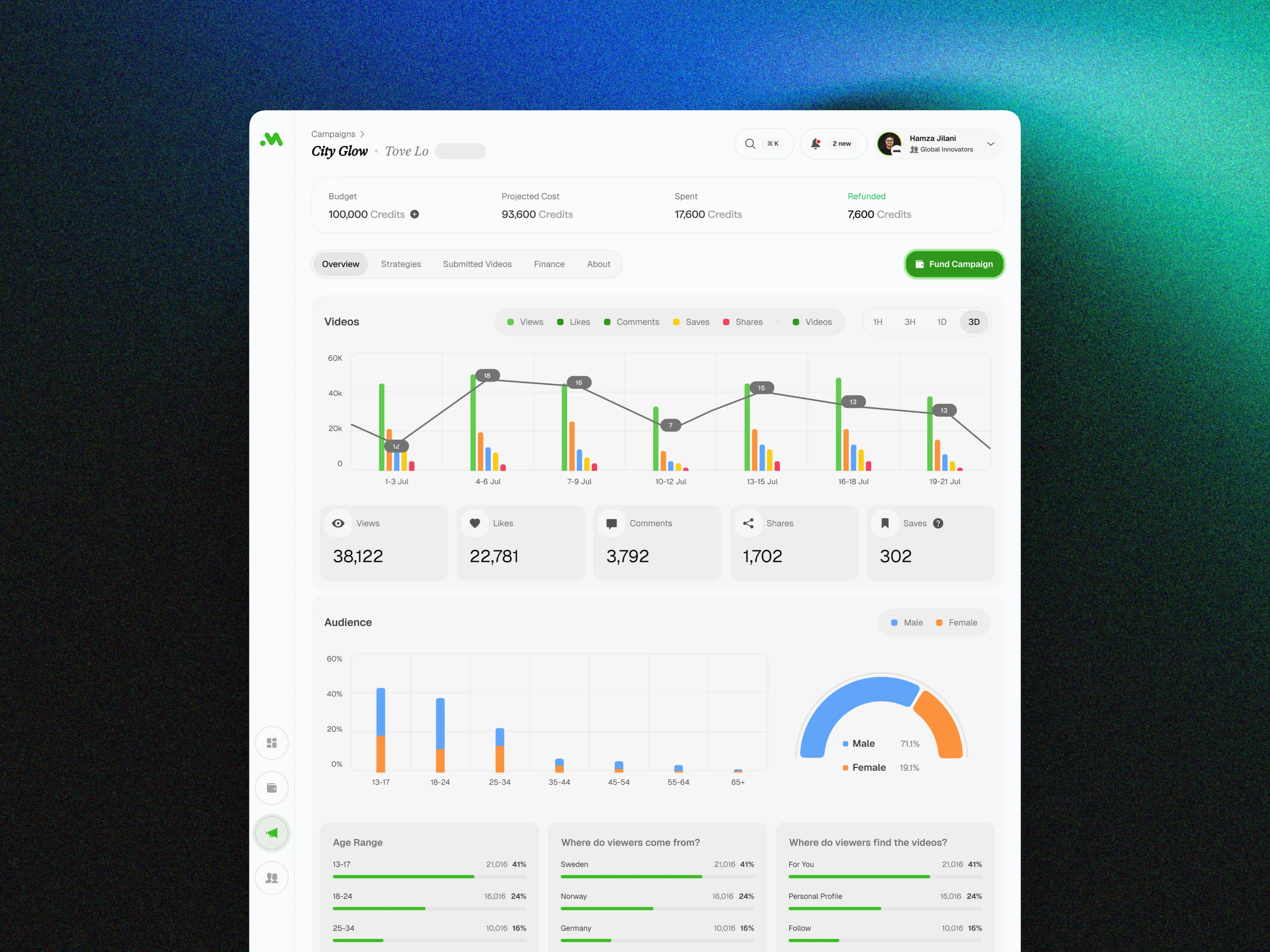
Complex workflows become hard to use when the structure hides what happens next.
People lose time when steps, ownership, rules and information are scattered across screens or systems. We map the real work, then design a clearer path through it.
“
What you get
Workflow Inventory
Task Hierarchy
Decision Rules
Information Model
State Map
Handoff Map
Navigation Model
Content Hierarchy
Exception States
Delivery Specs
Workflow Mapping and Prioritization
Document the steps, roles, decisions and dependencies in a process, then focus the design on the tasks that carry the most risk or effort.
Information Architecture and Navigation
Organize records, content and controls around the way people find information and move through their work.
Interface States and Decision Support
Define available actions, system feedback, exceptions and next steps so users can make informed decisions without guessing.
“
How it works
Mapped Around Real Work
Mapped Around Real Work
Mapped Around Real Work
1. Set the workflow boundary
Agree which process, roles, systems and outcomes are in scope. Record fixed policy, data, accessibility and technical constraints before changing the flow.
2. Map tasks, information and decisions
Trace the current steps, inputs, ownership, rules, handoffs and failure states. Separate required complexity from workarounds created by the existing interface.
3. Design the flow and structure
Create the task sequence, information hierarchy, navigation and interface states for the priority workflow. Keep exceptions and role differences visible.
4. Validate and prepare delivery
Review the proposed flow with users, subject-matter experts and delivery teams. Refine unclear decisions, then document the agreed screens, states and rules.
Related product work
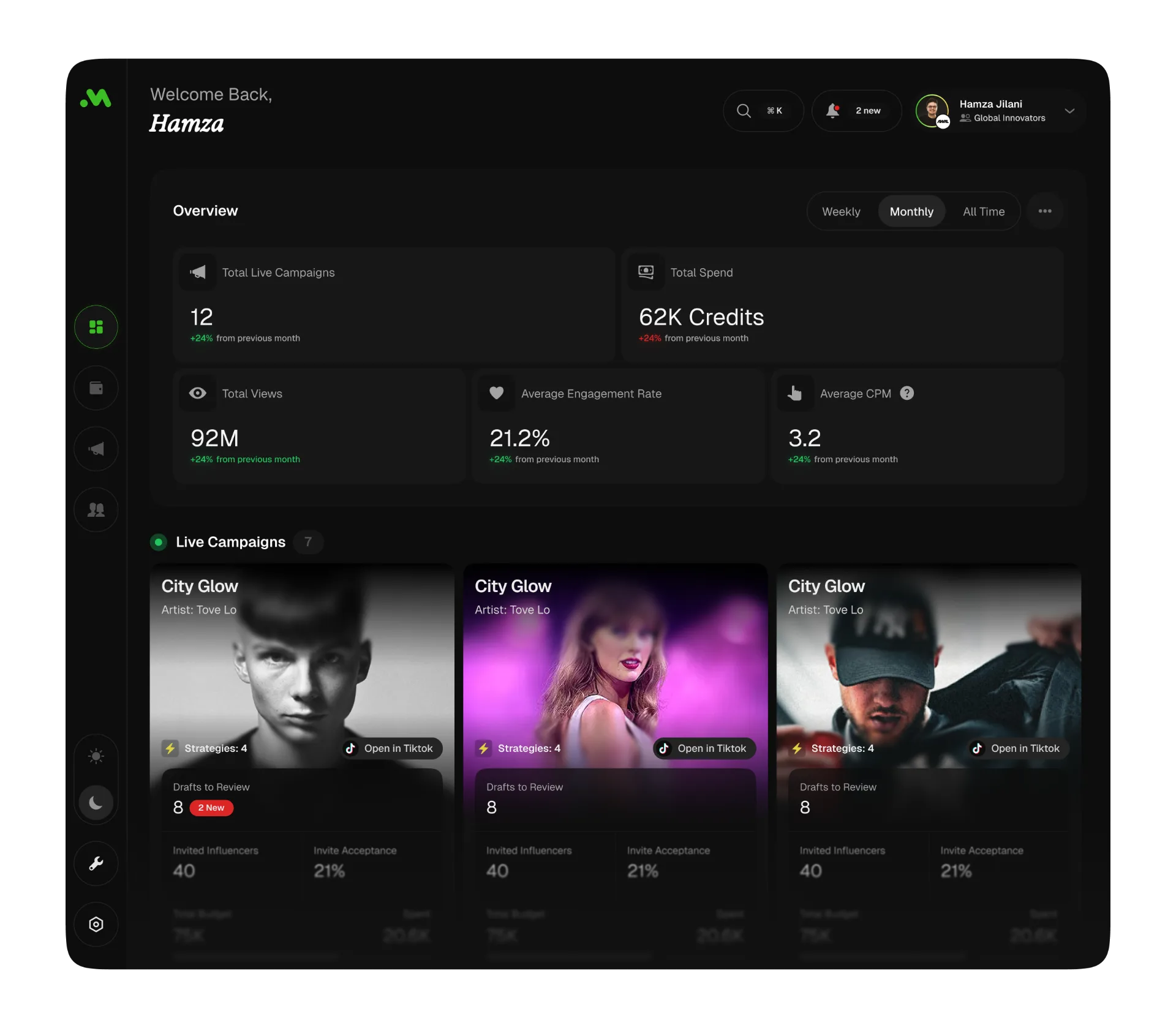
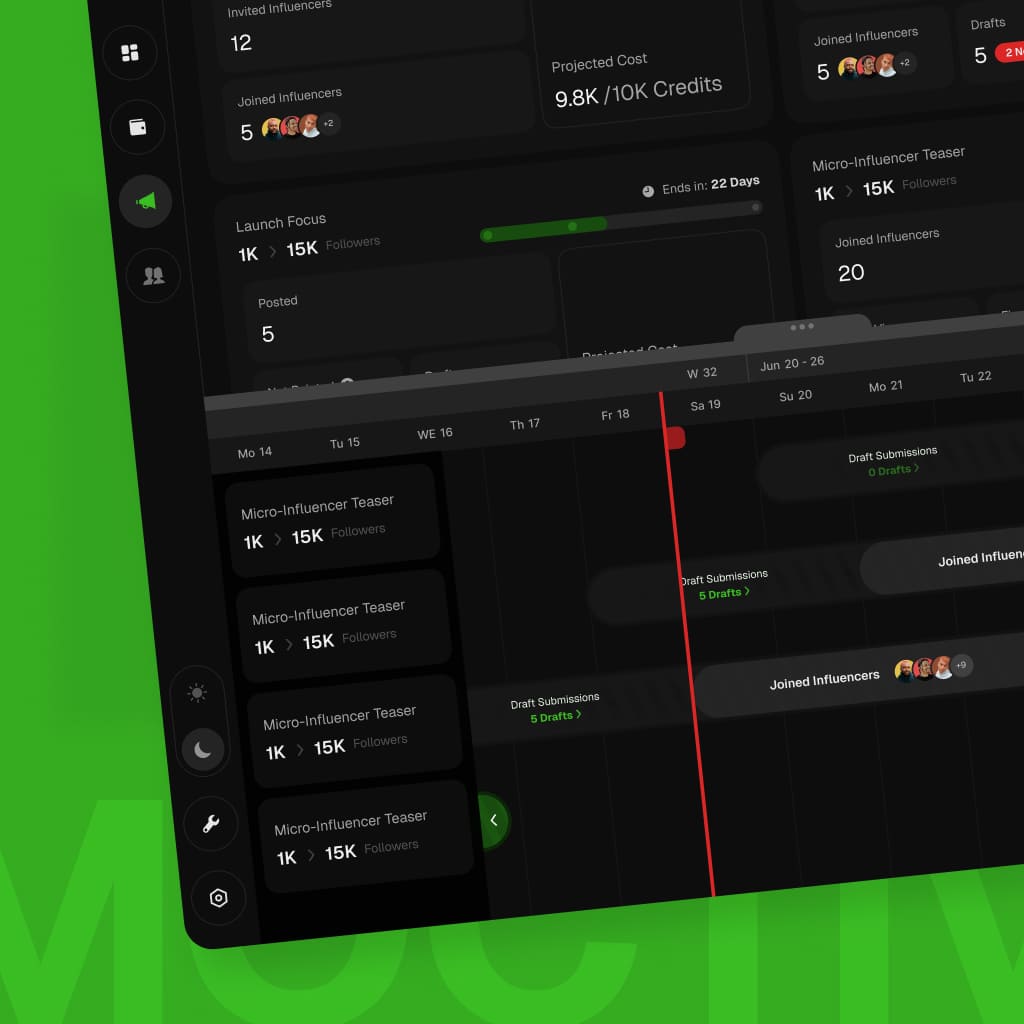
Explore Moktiv SaaS, a multi-role workspace where campaigns, creator activity and performance data move through connected workflows.
Moktiv SaaS
Campaign management for music labels, with creator activity and performance data in one workspace.
Music
Music
Industry
Industry
Web App
Web App
Project type
Project type
UX / UI
UX / UI
Design scope
Design scope
Tasks
Tasks
Campaign management
Campaign management
Data
Data
Performance review
Performance review
Roles
Roles
Team collaboration
Team collaboration
“
Decisions your workflow design can support
Clearer
Next StepsHelp users understand what happens now
Connect the current state, available action and expected result so people can move forward without reconstructing the process themselves.
Visible
DecisionsShow the rules behind each choice
Place the information, conditions and consequences needed for a decision close to the point where someone must make it.
Cleaner
HandoffsKeep responsibility visible between roles
Make ownership, status, required input and the next responsible person clear when work passes between users, teams or systems.
Consistent
StructureOrganize repeated information the same way
Use stable labels, grouping and navigation patterns so related records and tasks do not require a new mental model on every screen.
Safer
ExceptionsDesign for blocked and unusual states
Define errors, missing information, permission limits and recovery paths alongside the main flow instead of leaving them for implementation.
“
Workflow design support for complex products
Since 2008, trusted by brands that scale.

STC
,

Speedi
,

Motory
,

POSRocket
,
Telenav

Moktiv
,

Giant
,
VIBES
VIBES
Vibes
,
And many more growing teams.
“
Are they trustworthy?
“
“
 clearestproofiswhatclientssayaftertheworkships.
“
Plexable was a pleasure to work with!
We thoroughly enjoyed collaborating with Hamza, Abdul, and the team. They took ownership from day 1 and impressed us with their exceptional UX/UI expertise, and went above and beyond to help and support us.
Suruchi Gupta
Founder, Confidential

“
Working with Plexable
will accelerate your projectWorking with Plexable will accelerate your project. They provided me with extremely high-quality User Experience / Flow diagrams, and they provided it in a quick time frame and as promised. Unlike with other offshore providers that are reactive, Plexable drove the process and provided strong suggestions for improvement throughout. They took real ownership of the project as if it were their own.
Ahmad Wahidi
CEO, ELmeter

“
It was a genuinely smooth experience.
It was a genuinely smooth experience. They have a great eye for design, communicate clearly, and handle feedback with real professionalism. This was my second project with them, and once again, they delivered high-quality work ahead of schedule.
Omar Aref
Founder, DadCam
“
They delivered High Quality, Thoughtful Designs
We hired Hamza and his agency again for follow-up design work on our B2B SaaS platform, and as always, they did a fantastic job. had a pleasure to work with throughout. Reliable and flexible - we’ll definitely continue working with him.
Charles Pan
CPO, Revel Street

“
I have only good things
to say about the team at PlexableI have only good things to say about the team at Plexable. They bleed design and have a wealth of experience in UI/UX. The result for me was a very coherent design that is both beautiful and functional. I enjoyed every part of this project and can't wait for more projects with Plexable.
Mohammad Jawahri
CEO, Ursumli Game
“
It was a genuinely smooth experience
It was a genuinely smooth experience. They have a great eye for design, communicate clearly, and handle feedback with real professionalism. This was my second project with them, and once again, they delivered high-quality work ahead of schedule.
Truls Kasa
Co-Founder, Moktiv

“
Plexable helped us refine our core experience
By focusing on the logic, not just the visuals. They took our complex requirements and simplified them into a very clean, usable interface. It’s rare to find a design team that stays this focused on the actual end-user throughout the whole process.
Confidential
Co-Founder, Uxability
“
Plexable was a pleasure to work with!
We thoroughly enjoyed collaborating with Hamza, Abdul, and the team. They took ownership from day 1 and impressed us with their exceptional UX/UI expertise, and went above and beyond to help and support us.
Suruchi Gupta
Founder, Confidential
“
Working with Plexable
will accelerate your projectWorking with Plexable will accelerate your project. They provided me with extremely high-quality User Experience / Flow diagrams, and they provided it in a quick time frame and as promised. Unlike with other offshore providers that are reactive, Plexable drove the process and provided strong suggestions for improvement throughout. They took real ownership of the project as if it were their own.
Ahmad Wahidi
CEO, ELmeter
“
It was a genuinely smooth experience.
It was a genuinely smooth experience. They have a great eye for design, communicate clearly, and handle feedback with real professionalism. This was my second project with them, and once again, they delivered high-quality work ahead of schedule.
Omar Aref
Founder, DadCam
“
They delivered High Quality, Thoughtful Designs
We hired Hamza and his agency again for follow-up design work on our B2B SaaS platform, and as always, they did a fantastic job. had a pleasure to work with throughout. Reliable and flexible - we’ll definitely continue working with him.
Charles Pan
CPO, Revel Street
“
I have only good things
to say about the team at PlexableI have only good things to say about the team at Plexable. They bleed design and have a wealth of experience in UI/UX. The result for me was a very coherent design that is both beautiful and functional. I enjoyed every part of this project and can't wait for more projects with Plexable.
Mohammad Jawahri
CEO, Ursumli Game
“
It was a genuinely smooth experience
It was a genuinely smooth experience. They have a great eye for design, communicate clearly, and handle feedback with real professionalism. This was my second project with them, and once again, they delivered high-quality work ahead of schedule.
Truls Kasa
Co-Founder, Moktiv
“
Plexable helped us refine our core experience
By focusing on the logic, not just the visuals. They took our complex requirements and simplified them into a very clean, usable interface. It’s rare to find a design team that stays this focused on the actual end-user throughout the whole process.
Confidential
Co-Founder, Uxability
“
Plexable was a pleasure to work with!
We thoroughly enjoyed collaborating with Hamza, Abdul, and the team. They took ownership from day 1 and impressed us with their exceptional UX/UI expertise, and went above and beyond to help and support us.
Suruchi Gupta
Founder, Confidential
“
Working with Plexable
will accelerate your projectWorking with Plexable will accelerate your project. They provided me with extremely high-quality User Experience / Flow diagrams, and they provided it in a quick time frame and as promised. Unlike with other offshore providers that are reactive, Plexable drove the process and provided strong suggestions for improvement throughout. They took real ownership of the project as if it were their own.
Ahmad Wahidi
CEO, ELmeter
“
It was a genuinely smooth experience.
It was a genuinely smooth experience. They have a great eye for design, communicate clearly, and handle feedback with real professionalism. This was my second project with them, and once again, they delivered high-quality work ahead of schedule.
Omar Aref
Founder, DadCam
“
They delivered High Quality, Thoughtful Designs
We hired Hamza and his agency again for follow-up design work on our B2B SaaS platform, and as always, they did a fantastic job. had a pleasure to work with throughout. Reliable and flexible - we’ll definitely continue working with him.
Charles Pan
CPO, Revel Street
“
I have only good things
to say about the team at PlexableI have only good things to say about the team at Plexable. They bleed design and have a wealth of experience in UI/UX. The result for me was a very coherent design that is both beautiful and functional. I enjoyed every part of this project and can't wait for more projects with Plexable.
Mohammad Jawahri
CEO, Ursumli Game
“
It was a genuinely smooth experience
It was a genuinely smooth experience. They have a great eye for design, communicate clearly, and handle feedback with real professionalism. This was my second project with them, and once again, they delivered high-quality work ahead of schedule.
Truls Kasa
Co-Founder, Moktiv
“
Plexable helped us refine our core experience
By focusing on the logic, not just the visuals. They took our complex requirements and simplified them into a very clean, usable interface. It’s rare to find a design team that stays this focused on the actual end-user throughout the whole process.
Confidential
Co-Founder, Uxability
“
Plexable was a pleasure to work with!
We thoroughly enjoyed collaborating with Hamza, Abdul, and the team. They took ownership from day 1 and impressed us with their exceptional UX/UI expertise, and went above and beyond to help and support us.
Suruchi Gupta
Founder, Confidential
“
Working with Plexable
will accelerate your projectWorking with Plexable will accelerate your project. They provided me with extremely high-quality User Experience / Flow diagrams, and they provided it in a quick time frame and as promised. Unlike with other offshore providers that are reactive, Plexable drove the process and provided strong suggestions for improvement throughout. They took real ownership of the project as if it were their own.
Ahmad Wahidi
CEO, ELmeter
“
It was a genuinely smooth experience.
It was a genuinely smooth experience. They have a great eye for design, communicate clearly, and handle feedback with real professionalism. This was my second project with them, and once again, they delivered high-quality work ahead of schedule.
Omar Aref
Founder, DadCam
“
They delivered High Quality, Thoughtful Designs
We hired Hamza and his agency again for follow-up design work on our B2B SaaS platform, and as always, they did a fantastic job. had a pleasure to work with throughout. Reliable and flexible - we’ll definitely continue working with him.
Charles Pan
CPO, Revel Street
“
I have only good things
to say about the team at PlexableI have only good things to say about the team at Plexable. They bleed design and have a wealth of experience in UI/UX. The result for me was a very coherent design that is both beautiful and functional. I enjoyed every part of this project and can't wait for more projects with Plexable.
Mohammad Jawahri
CEO, Ursumli Game
“
It was a genuinely smooth experience
It was a genuinely smooth experience. They have a great eye for design, communicate clearly, and handle feedback with real professionalism. This was my second project with them, and once again, they delivered high-quality work ahead of schedule.
Truls Kasa
Co-Founder, Moktiv
“
Plexable helped us refine our core experience
By focusing on the logic, not just the visuals. They took our complex requirements and simplified them into a very clean, usable interface. It’s rare to find a design team that stays this focused on the actual end-user throughout the whole process.
Confidential
Co-Founder, Uxability
“
Plexable was a pleasure to work with!
We thoroughly enjoyed collaborating with Hamza, Abdul, and the team. They took ownership from day 1 and impressed us with their exceptional UX/UI expertise, and went above and beyond to help and support us.
Suruchi Gupta
Founder, Confidential
“
Plexable was a pleasure to work with!
We thoroughly enjoyed collaborating with Hamza, Abdul, and the team. They took ownership from day 1 and impressed us with their exceptional UX/UI expertise, and went above and beyond to help and support us.
Ahmad Wahidi
CEO, ELmeter
“
It was a genuinely smooth experience.
It was a genuinely smooth experience. They have a great eye for design, communicate clearly, and handle feedback with real professionalism. This was my second project with them, and once again, they delivered high-quality work ahead of schedule.
Omar Aref
Founder, DadCam
“
They delivered High Quality, Thoughtful Designs
We hired Hamza and his agency again for follow-up design work on our B2B SaaS platform, and as always, they did a fantastic job. had a pleasure to work with throughout. Reliable and flexible - we’ll definitely continue working with him.
Charles Pan
CPO, Revel Street
“
I have only good thingsto say about the team at Plexable
I have only good things to say about the team at Plexable. They bleed design and have a wealth of experience in UI/UX. The result for me was a very coherent design that is both beautiful and functional. I enjoyed every part of this project and can't wait for more projects with Plexable.
Mohammad Jawahri
CEO, Ursumli Game
“
They delivered High Quality, Thoughtful Designs
We hired Hamza and his agency again for follow-up design work on our B2B SaaS platform, and as always, they did a fantastic job. had a pleasure to work with throughout. Reliable and flexible - we’ll definitely continue working with him.
Truls Kasa
Co-Founder, Moktiv
“
Plexable helped us refine our core experience
By focusing on the logic, not just the visuals. They took our complex requirements and simplified them into a very clean, usable interface. It’s rare to find a design team that stays this focused on the actual end-user throughout the whole process.
Confidential
Co-Founder, Uxability
“
Plexable was a pleasure to work with!
We thoroughly enjoyed collaborating with Hamza, Abdul, and the team. They took ownership from day 1 and impressed us with their exceptional UX/UI expertise, and went above and beyond to help and support us.
Suruchi Gupta
Founder, Confidential
“
Plexable was a pleasure to work with!
We thoroughly enjoyed collaborating with Hamza, Abdul, and the team. They took ownership from day 1 and impressed us with their exceptional UX/UI expertise, and went above and beyond to help and support us.
Ahmad Wahidi
CEO, ELmeter
“
It was a genuinely smooth experience.
It was a genuinely smooth experience. They have a great eye for design, communicate clearly, and handle feedback with real professionalism. This was my second project with them, and once again, they delivered high-quality work ahead of schedule.
Omar Aref
Founder, DadCam
“
They delivered High Quality, Thoughtful Designs
We hired Hamza and his agency again for follow-up design work on our B2B SaaS platform, and as always, they did a fantastic job. had a pleasure to work with throughout. Reliable and flexible - we’ll definitely continue working with him.
Charles Pan
CPO, Revel Street
“
I have only good thingsto say about the team at Plexable
I have only good things to say about the team at Plexable. They bleed design and have a wealth of experience in UI/UX. The result for me was a very coherent design that is both beautiful and functional. I enjoyed every part of this project and can't wait for more projects with Plexable.
Mohammad Jawahri
CEO, Ursumli Game
“
They delivered High Quality, Thoughtful Designs
We hired Hamza and his agency again for follow-up design work on our B2B SaaS platform, and as always, they did a fantastic job. had a pleasure to work with throughout. Reliable and flexible - we’ll definitely continue working with him.
Truls Kasa
Co-Founder, Moktiv
“
Plexable helped us refine our core experience
By focusing on the logic, not just the visuals. They took our complex requirements and simplified them into a very clean, usable interface. It’s rare to find a design team that stays this focused on the actual end-user throughout the whole process.
Confidential
Co-Founder, Uxability
“
Plexable was a pleasure to work with!
We thoroughly enjoyed collaborating with Hamza, Abdul, and the team. They took ownership from day 1 and impressed us with their exceptional UX/UI expertise, and went above and beyond to help and support us.
Suruchi Gupta
Founder, Confidential
“
Plexable was a pleasure to work with!
We thoroughly enjoyed collaborating with Hamza, Abdul, and the team. They took ownership from day 1 and impressed us with their exceptional UX/UI expertise, and went above and beyond to help and support us.
Ahmad Wahidi
CEO, ELmeter
“
It was a genuinely smooth experience.
It was a genuinely smooth experience. They have a great eye for design, communicate clearly, and handle feedback with real professionalism. This was my second project with them, and once again, they delivered high-quality work ahead of schedule.
Omar Aref
Founder, DadCam
“
They delivered High Quality, Thoughtful Designs
We hired Hamza and his agency again for follow-up design work on our B2B SaaS platform, and as always, they did a fantastic job. had a pleasure to work with throughout. Reliable and flexible - we’ll definitely continue working with him.
Charles Pan
CPO, Revel Street
“
I have only good thingsto say about the team at Plexable
I have only good things to say about the team at Plexable. They bleed design and have a wealth of experience in UI/UX. The result for me was a very coherent design that is both beautiful and functional. I enjoyed every part of this project and can't wait for more projects with Plexable.
Mohammad Jawahri
CEO, Ursumli Game
“
They delivered High Quality, Thoughtful Designs
We hired Hamza and his agency again for follow-up design work on our B2B SaaS platform, and as always, they did a fantastic job. had a pleasure to work with throughout. Reliable and flexible - we’ll definitely continue working with him.
Truls Kasa
Co-Founder, Moktiv
“
Plexable helped us refine our core experience
By focusing on the logic, not just the visuals. They took our complex requirements and simplified them into a very clean, usable interface. It’s rare to find a design team that stays this focused on the actual end-user throughout the whole process.
Confidential
Co-Founder, Uxability
“
Plexable was a pleasure to work with!
We thoroughly enjoyed collaborating with Hamza, Abdul, and the team. They took ownership from day 1 and impressed us with their exceptional UX/UI expertise, and went above and beyond to help and support us.
Suruchi Gupta
Founder, Confidential
“
Plexable was a pleasure to work with!
We thoroughly enjoyed collaborating with Hamza, Abdul, and the team. They took ownership from day 1 and impressed us with their exceptional UX/UI expertise, and went above and beyond to help and support us.
Ahmad Wahidi
CEO, ELmeter
“
It was a genuinely smooth experience.
It was a genuinely smooth experience. They have a great eye for design, communicate clearly, and handle feedback with real professionalism. This was my second project with them, and once again, they delivered high-quality work ahead of schedule.
Omar Aref
Founder, DadCam
“
They delivered High Quality, Thoughtful Designs
We hired Hamza and his agency again for follow-up design work on our B2B SaaS platform, and as always, they did a fantastic job. had a pleasure to work with throughout. Reliable and flexible - we’ll definitely continue working with him.
Charles Pan
CPO, Revel Street
“
I have only good thingsto say about the team at Plexable
I have only good things to say about the team at Plexable. They bleed design and have a wealth of experience in UI/UX. The result for me was a very coherent design that is both beautiful and functional. I enjoyed every part of this project and can't wait for more projects with Plexable.
Mohammad Jawahri
CEO, Ursumli Game
“
They delivered High Quality, Thoughtful Designs
We hired Hamza and his agency again for follow-up design work on our B2B SaaS platform, and as always, they did a fantastic job. had a pleasure to work with throughout. Reliable and flexible - we’ll definitely continue working with him.
Truls Kasa
Co-Founder, Moktiv
“
Plexable helped us refine our core experience
By focusing on the logic, not just the visuals. They took our complex requirements and simplified them into a very clean, usable interface. It’s rare to find a design team that stays this focused on the actual end-user throughout the whole process.
Confidential
Co-Founder, Uxability
“
Plexable was a pleasure to work with!
We thoroughly enjoyed collaborating with Hamza, Abdul, and the team. They took ownership from day 1 and impressed us with their exceptional UX/UI expertise, and went above and beyond to help and support us.
Suruchi Gupta
Founder, Confidential
“
Working with Plexablewill accelerate your project
Working with Plexable will accelerate your project. They provided me with extremely high-quality User Experience / Flow diagrams, and they provided it in a quick time frame and as promised. Unlike with other offshore providers that are reactive, Plexable drove the process and provided strong suggestions for improvement throughout. They took real ownership of the project as if it were their own.
Ahmad Wahidi
CEO, ELmeter
“
It was a genuinely smooth experience.
It was a genuinely smooth experience. They have a great eye for design, communicate clearly, and handle feedback with real professionalism. This was my second project with them, and once again, they delivered high-quality work ahead of schedule.
Omar Aref
Founder, DadCam
“
They delivered High Quality, Thoughtful Designs
We hired Hamza and his agency again for follow-up design work on our B2B SaaS platform, and as always, they did a fantastic job. had a pleasure to work with throughout. Reliable and flexible - we’ll definitely continue working with him.
Charles Pan
CPO, Revel Street
“
I have only good thingsto say about the team at Plexable
I have only good things to say about the team at Plexable. They bleed design and have a wealth of experience in UI/UX. The result for me was a very coherent design that is both beautiful and functional. I enjoyed every part of this project and can't wait for more projects with Plexable.
Mohammad Jawahri
CEO, Ursumli Game
“
They delivered High Quality, Thoughtful Designs
We hired Hamza and his agency again for follow-up design work on our B2B SaaS platform, and as always, they did a fantastic job. had a pleasure to work with throughout. Reliable and flexible - we’ll definitely continue working with him.
Truls Kasa
Co-Founder, Moktiv
“
Plexable helped us refine our core experience
By focusing on the logic, not just the visuals. They took our complex requirements and simplified them into a very clean, usable interface. It’s rare to find a design team that stays this focused on the actual end-user throughout the whole process.
Confidential
Co-Founder, Uxability
“
Plexable was a pleasure to work with!
We thoroughly enjoyed collaborating with Hamza, Abdul, and the team. They took ownership from day 1 and impressed us with their exceptional UX/UI expertise, and went above and beyond to help and support us.
Suruchi Gupta
Founder, Confidential
“
Working with Plexablewill accelerate your project
Working with Plexable will accelerate your project. They provided me with extremely high-quality User Experience / Flow diagrams, and they provided it in a quick time frame and as promised. Unlike with other offshore providers that are reactive, Plexable drove the process and provided strong suggestions for improvement throughout. They took real ownership of the project as if it were their own.
Ahmad Wahidi
CEO, ELmeter
“
It was a genuinely smooth experience.
It was a genuinely smooth experience. They have a great eye for design, communicate clearly, and handle feedback with real professionalism. This was my second project with them, and once again, they delivered high-quality work ahead of schedule.
Omar Aref
Founder, DadCam
“
They delivered High Quality, Thoughtful Designs
We hired Hamza and his agency again for follow-up design work on our B2B SaaS platform, and as always, they did a fantastic job. had a pleasure to work with throughout. Reliable and flexible - we’ll definitely continue working with him.
Charles Pan
CPO, Revel Street
“
I have only good thingsto say about the team at Plexable
I have only good things to say about the team at Plexable. They bleed design and have a wealth of experience in UI/UX. The result for me was a very coherent design that is both beautiful and functional. I enjoyed every part of this project and can't wait for more projects with Plexable.
Mohammad Jawahri
CEO, Ursumli Game
“
They delivered High Quality, Thoughtful Designs
We hired Hamza and his agency again for follow-up design work on our B2B SaaS platform, and as always, they did a fantastic job. had a pleasure to work with throughout. Reliable and flexible - we’ll definitely continue working with him.
Truls Kasa
Co-Founder, Moktiv
“
Plexable helped us refine our core experience
By focusing on the logic, not just the visuals. They took our complex requirements and simplified them into a very clean, usable interface. It’s rare to find a design team that stays this focused on the actual end-user throughout the whole process.
Confidential
Co-Founder, Uxability
“
Plexable was a pleasure to work with!
We thoroughly enjoyed collaborating with Hamza, Abdul, and the team. They took ownership from day 1 and impressed us with their exceptional UX/UI expertise, and went above and beyond to help and support us.
Suruchi Gupta
Founder, Confidential
“
Working with Plexablewill accelerate your project
Working with Plexable will accelerate your project. They provided me with extremely high-quality User Experience / Flow diagrams, and they provided it in a quick time frame and as promised. Unlike with other offshore providers that are reactive, Plexable drove the process and provided strong suggestions for improvement throughout. They took real ownership of the project as if it were their own.
Ahmad Wahidi
CEO, ELmeter
“
It was a genuinely smooth experience.
It was a genuinely smooth experience. They have a great eye for design, communicate clearly, and handle feedback with real professionalism. This was my second project with them, and once again, they delivered high-quality work ahead of schedule.
Omar Aref
Founder, DadCam
“
They delivered High Quality, Thoughtful Designs
We hired Hamza and his agency again for follow-up design work on our B2B SaaS platform, and as always, they did a fantastic job. had a pleasure to work with throughout. Reliable and flexible - we’ll definitely continue working with him.
Charles Pan
CPO, Revel Street
“
I have only good thingsto say about the team at Plexable
I have only good things to say about the team at Plexable. They bleed design and have a wealth of experience in UI/UX. The result for me was a very coherent design that is both beautiful and functional. I enjoyed every part of this project and can't wait for more projects with Plexable.
Mohammad Jawahri
CEO, Ursumli Game
“
They delivered High Quality, Thoughtful Designs
We hired Hamza and his agency again for follow-up design work on our B2B SaaS platform, and as always, they did a fantastic job. had a pleasure to work with throughout. Reliable and flexible - we’ll definitely continue working with him.
Truls Kasa
Co-Founder, Moktiv
“
Plexable helped us refine our core experience
By focusing on the logic, not just the visuals. They took our complex requirements and simplified them into a very clean, usable interface. It’s rare to find a design team that stays this focused on the actual end-user throughout the whole process.
Confidential
Co-Founder, Uxability
“
Plexable was a pleasure to work with!
We thoroughly enjoyed collaborating with Hamza, Abdul, and the team. They took ownership from day 1 and impressed us with their exceptional UX/UI expertise, and went above and beyond to help and support us.
Suruchi Gupta
Founder, Confidential
“
Working with Plexablewill accelerate your project
Working with Plexable will accelerate your project. They provided me with extremely high-quality User Experience / Flow diagrams, and they provided it in a quick time frame and as promised. Unlike with other offshore providers that are reactive, Plexable drove the process and provided strong suggestions for improvement throughout. They took real ownership of the project as if it were their own.
Ahmad Wahidi
CEO, ELmeter
“
It was a genuinely smooth experience.
It was a genuinely smooth experience. They have a great eye for design, communicate clearly, and handle feedback with real professionalism. This was my second project with them, and once again, they delivered high-quality work ahead of schedule.
Omar Aref
Founder, DadCam
“
They delivered High Quality, Thoughtful Designs
We hired Hamza and his agency again for follow-up design work on our B2B SaaS platform, and as always, they did a fantastic job. had a pleasure to work with throughout. Reliable and flexible - we’ll definitely continue working with him.
Charles Pan
CPO, Revel Street
“
I have only good thingsto say about the team at Plexable
I have only good things to say about the team at Plexable. They bleed design and have a wealth of experience in UI/UX. The result for me was a very coherent design that is both beautiful and functional. I enjoyed every part of this project and can't wait for more projects with Plexable.
Mohammad Jawahri
CEO, Ursumli Game
“
They delivered High Quality, Thoughtful Designs
We hired Hamza and his agency again for follow-up design work on our B2B SaaS platform, and as always, they did a fantastic job. had a pleasure to work with throughout. Reliable and flexible - we’ll definitely continue working with him.
Truls Kasa
Co-Founder, Moktiv
“
Plexable helped us refine our core experience
By focusing on the logic, not just the visuals. They took our complex requirements and simplified them into a very clean, usable interface. It’s rare to find a design team that stays this focused on the actual end-user throughout the whole process.
Confidential
Co-Founder, Uxability
Frequently Asked Questions
Process mapping documents how work moves through an organization. Information architecture organizes content and navigation. Workflow design connects both to the product experience: the steps a user takes, the information they need, the decisions they make, the system states they encounter and the feedback that helps them continue. An engagement may include process maps and information architecture, but the agreed product workflow remains the design boundary.
Useful inputs include current screens, process documents, role definitions, decision rules, field lists, status models, support themes, analytics and known technical constraints. We also need working sessions with product owners, subject-matter experts and, where possible, people who perform the task. Use redacted records and the minimum access needed. Unknown rules or dependencies are recorded as open questions rather than treated as facts.
Yes. We can design around fixed APIs, legacy services, existing permissions, current design systems and phased migration plans. The work separates interface and information improvements that fit the current platform from structural changes that require engineering or operational work. Your technical and process owners confirm feasibility, policy and migration decisions; we document those dependencies in the handoff.
Depending on scope, the handoff can include a workflow inventory, task model, current and proposed flow diagrams, decision rules, information architecture, navigation, content hierarchy, state and exception maps, interface screens, prototypes and delivery specifications. We agree which roles, systems and workflow stages are included before starting. Coded implementation or organization-wide process redesign is included only when named in the scope.
We review the model with subject-matter experts and delivery teams, then test priority tasks with representative users when access is available. Validation can examine whether people understand the sequence, find the right information, interpret states and recover from exceptions. If user access, realistic data or technical review is unavailable, we label those parts as unvalidated instead of presenting the workflow as proven.
We can support engineering through handoff and design review. Production development, integration changes, data migration and operational rollout are separate unless included in the agreement. Measures depend on the task and may include completion rate, error rate, rework, support demand, cycle time or successful handoffs. Baseline data and a measurement owner are needed to assess change, and design alone cannot guarantee a specific operational or financial result.
Process mapping documents how work moves through an organization. Information architecture organizes content and navigation. Workflow design connects both to the product experience: the steps a user takes, the information they need, the decisions they make, the system states they encounter and the feedback that helps them continue. An engagement may include process maps and information architecture, but the agreed product workflow remains the design boundary.
Useful inputs include current screens, process documents, role definitions, decision rules, field lists, status models, support themes, analytics and known technical constraints. We also need working sessions with product owners, subject-matter experts and, where possible, people who perform the task. Use redacted records and the minimum access needed. Unknown rules or dependencies are recorded as open questions rather than treated as facts.
Yes. We can design around fixed APIs, legacy services, existing permissions, current design systems and phased migration plans. The work separates interface and information improvements that fit the current platform from structural changes that require engineering or operational work. Your technical and process owners confirm feasibility, policy and migration decisions; we document those dependencies in the handoff.
Depending on scope, the handoff can include a workflow inventory, task model, current and proposed flow diagrams, decision rules, information architecture, navigation, content hierarchy, state and exception maps, interface screens, prototypes and delivery specifications. We agree which roles, systems and workflow stages are included before starting. Coded implementation or organization-wide process redesign is included only when named in the scope.
We review the model with subject-matter experts and delivery teams, then test priority tasks with representative users when access is available. Validation can examine whether people understand the sequence, find the right information, interpret states and recover from exceptions. If user access, realistic data or technical review is unavailable, we label those parts as unvalidated instead of presenting the workflow as proven.
We can support engineering through handoff and design review. Production development, integration changes, data migration and operational rollout are separate unless included in the agreement. Measures depend on the task and may include completion rate, error rate, rework, support demand, cycle time or successful handoffs. Baseline data and a measurement owner are needed to assess change, and design alone cannot guarantee a specific operational or financial result.
Process mapping documents how work moves through an organization. Information architecture organizes content and navigation. Workflow design connects both to the product experience: the steps a user takes, the information they need, the decisions they make, the system states they encounter and the feedback that helps them continue. An engagement may include process maps and information architecture, but the agreed product workflow remains the design boundary.
Useful inputs include current screens, process documents, role definitions, decision rules, field lists, status models, support themes, analytics and known technical constraints. We also need working sessions with product owners, subject-matter experts and, where possible, people who perform the task. Use redacted records and the minimum access needed. Unknown rules or dependencies are recorded as open questions rather than treated as facts.
Yes. We can design around fixed APIs, legacy services, existing permissions, current design systems and phased migration plans. The work separates interface and information improvements that fit the current platform from structural changes that require engineering or operational work. Your technical and process owners confirm feasibility, policy and migration decisions; we document those dependencies in the handoff.
Depending on scope, the handoff can include a workflow inventory, task model, current and proposed flow diagrams, decision rules, information architecture, navigation, content hierarchy, state and exception maps, interface screens, prototypes and delivery specifications. We agree which roles, systems and workflow stages are included before starting. Coded implementation or organization-wide process redesign is included only when named in the scope.
We review the model with subject-matter experts and delivery teams, then test priority tasks with representative users when access is available. Validation can examine whether people understand the sequence, find the right information, interpret states and recover from exceptions. If user access, realistic data or technical review is unavailable, we label those parts as unvalidated instead of presenting the workflow as proven.
We can support engineering through handoff and design review. Production development, integration changes, data migration and operational rollout are separate unless included in the agreement. Measures depend on the task and may include completion rate, error rate, rework, support demand, cycle time or successful handoffs. Baseline data and a measurement owner are needed to assess change, and design alone cannot guarantee a specific operational or financial result.
Still have a question?
Which process is hardest for your users to follow?
Say
Say

Hello
Hello
Interested in joining our team?

Jordan